
General program guidance
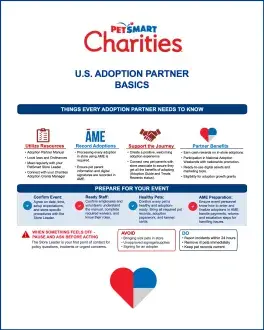
Whether you've completed hundreds of adoptions in PetSmart stores or you're getting ready for your first, this is your guide to how the program works. Start here with everything an adoption partner needs to know, then use the sections below whenever you need the details.
Start Here
Playbook for Adoption Partners
-
FoundationUse your resourcesOpen the manual
Read through the Adoption Partner Manual, be familiar with local laws, and build relationships with your Store Leader, In-Store Adoption Ambassador and the Adoptions Grant Manager in your region. Take time to download and read the manual and in-store adoptions event training to understand program rules, in-store requirements, processing adoptions and animal care standards.
-
FoundationRecord every adoption in ĀMEGo to ĀME setup & training
Every adoption in a PetSmart store must be processed in ĀME, with the pet parent’s information and their own digital signature recorded.
-
FoundationCreate a welcoming experienceHow to run an event
Pet parents remember how they were treated during the adoption process. Ensure your event includes enough staff and/or volunteers to make the process friendly, non-biased, smooth and efficient. After processing adoptions, introduce new pet parents to a store associate so they get all the benefits of adopting, including the Adoption Guide and information to claim Treats VIPP status as in-store adopters.
In-Store Adoptions
Adoption partner manualDay-to-day business of in-store adoptions
-
Before the eventPlanning EventsPartner marketing resources
Adoption events increase exposure for the adoptable pets in your care. National Adoption Week and Adopt Joy events are the most popular and supported by marketing, but you can hold in-store events any day once your Store Leader agrees to the date and time.
Before booking the event
- Talk with your Store Leader about where in the store adoptions will happen, when you'll be there, and what you and/or your team will bring.
- Promote your event to drive traffic through local media outreach, social media messaging and other channels: use the Partner Marketing Toolkit for tips, templates, pictures and direction.
- Share your volunteer schedule with the Store Leader and tell them right away if it changes.
- Confirm every volunteer has a signed volunteer waiver on file with your organization.
- Planning to be outdoors? Work with store leadership to ensure permission and set-up. Outdoor adoptions require temperatures between 60° and 90°F, plus shade, clean drinking water, and ventilated crates.
Plan around National Adoption Week and Adopt Joy Events
National Adoption Week & Adopt Joy events are great times to host an event. Check with your Store Leader or Adoptions Grant Manager about opportunities.
-
During the eventSet up your space
- Ask the Store Leader if you need a table and keep supplies and décor simple. You can include your organization's informational materials, including an approved donation canister (only while your team is there), promotional posters, pet photos, and adoption paperwork.
- Refrain from soliciting for fundraising or for food or product donations, and from promoting services that compete with PetSmart's, such as grooming, training, or boarding.
- Post only signs approved by PetSmart and PetSmart Charities.
Handle every pet safely
- Pets must be comfortable in enclosed spaces or leashed and under the care of a team member. Cats stay in carriers when moving through the store.
- Keep young children a foot or two away from pets until a parent or guardian is there.
Only your approved personnel, or a PetSmart Associate you've trained, handle pets for adopters.
Talk with adopters- Explain the adoption process and help pet parents find the right match for their family and lifestyle.
- Suggest resources for training and behavior. Store staff can provide information about PetSmart’s in-store training services.
- If a potential adopter must be turned down, be transparent and explain why. Suggest pets that might fit better, and offer thanks for their interest. They could be future adopters, volunteers, fosters, or donors.
-
After the eventWrap up
- When your event finishes, help clean the adoption area: sweep, mop, sanitize with approved cleaners, wash bowls, and break down crates.
- Confirm every adoption from the event is recorded in ĀME and assigned to your Adoption Partner Number. Only recorded adoptions count toward rewards.
Your in-store team
Work with your team to develop a successful adoption program. Your Store Leader, Adoption Ambassador and Adoptions Grant Manager are available for program support.
Store Leader
Your day-to-day partner and first point of contact around in-store adoptions and adoption events. New partners should plan to meet them before your first adoption event and then connect with them regularly to build a strong relationship.
In-Store Adoption Ambassador
Most stores have an Adoption Ambassador, an associate who champions adoptions and can lend support during your events.
Adoptions Grant Manager
Connect with the Adoptions Grant Manager for your region during their office hours to start building a strong relationship. They’re your contact for the program, the manual and rewards.
Health, safety & animal care
Every pet healthy, vaccinated and ready to meet adopters
Every adoptable pet brought in-store must be healthy, vaccinated, altered according to PetSmart Charities policy and ready to meet potential adopters. Also consult local laws to be certain of compliance.
Before pets arrive
- Ensure each adoptable pet has been seen by a veterinarian, vaccinated, and behaviorally assessed by your team before coming to the store.
- Pets must be vaccinated and monitored for at least 24 hours before entering a PetSmart store. A rabies certificate or vaccination record (for age-appropriate pets) must be available at the store or pets won’t be allowed entry.
- Dogs and cats 6 months and older must be spayed or neutered before adoption. No intact pet that age can be displayed in the store or sent home with a voucher. Younger unaltered puppies and kittens may join centers and events under the Spay/Neuter Initiative, where local law allows.
- After surgery, wait at least 24 hours with surgical sites sealed. Sedated pets can’t come to the store.
- Puppies or kittens under 8 weeks old may not participate in in-store events.
The care and keeping of adoptable pets in-store
- Every pet must have an approved cage card that matches its vaccination record. Tip: use the Rescue Writer tool to generate bios quickly.
- Pets should always have food, clean water, and a clean space. PetSmart associates check on pets multiple times a day.
- If a pet is sick or injured, get veterinary care right away and remove them from the store. Cost or inconvenience is never a reason to wait. Ill pets can’t be adopted or stay until fully healthy, so pick up a pet as soon as you’re notified, and no later than the end of the day.
- Spay/neuter and microchipping procedures are never permitted at a PetSmart store or in its parking lot.
Approved species
- Dogs and cats
- Domesticated birds
- Small animals and reptiles PetSmart sells (not rats)
- Other non-venomous reptiles
- Ferrets (varies by state)
- Rabbits, vaccinated against RHDV2
- No livestock.
Special case
FeLV/FIV-positive cats may be in everyday centers, housed alone except for bonded pairs.
Report any incident to the Store Leader within 24 hours
That includes a pet needing medical help, a bite or scratch, an escape, a death, a theft, an abandonment, or a dog fight.
- After a bite or scratch, get the person medical attention (call 911 for serious wounds or bites to the face), then isolate the pet and report bites to local animal control. Pets that have bitten or scratched a person can’t come back to a PetSmart store for adoption.
- If a pet escapes, alert the Store Leader right away so Associates can cover the doors.
- For contagious illness (parvo, kennel cough, panleukopenia, ringworm), tell the Store Leader, remove all pets from the adoption area for at least 48 hours, and fully clean and disinfect.
YOUR PARTNER PORTAL
Go to SmartSimpleSmartSimple basics
-
STEP 1RegisterRegister or log in
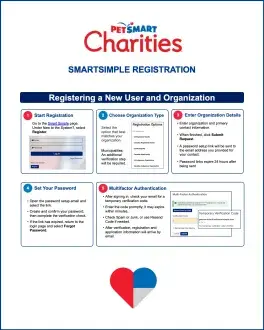
- Go to petsmartcharities.smartsimple.com and click Register.
- Each person on your team needs their own account; one primary contact receives the email notifications.
- Password links expire after 24 hours. Login verification codes arrive by email: use the newest one, and check Spam or Junk.
-
STEP 2Apply
- Adoption Partner applications and grant invitations appear under Funding and Adoption Partner Opportunities on your dashboard.
- Complete every tab, including Project Information and Metrics, then click Submit.
- Once an application is approved, your Adoption Reward Payments are available from the homepage.
-
STEP 3Submit reports
- Open Grant Activity › Reports (In Progress) on your dashboard and select the report.
- Complete both Report Details (successes, challenges, marketing, supporting documents) and Metrics (outcomes, budget, adoption numbers).
- Final Review, then Submit by the deadline. Late reports can delay or withhold payments.
Quick user guides
Short, printable guides you can keep on hand or share with new volunteers.
Adoption Partner Basics
The essentials of our in-store adoption program: your in-store team, ĀME, event rules and animal care standards.
Building a Sustainable Adoption Program
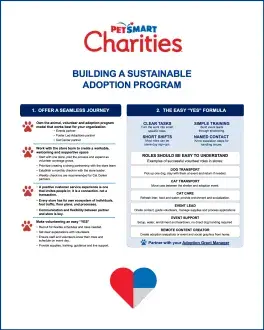
Practices for growing a steady, well-staffed adoption presence in your store, from volunteer planning to event rhythm.
SmartSimple Quick User Guide
Registration, passwords and verification codes, applying and submitting reports in the partner portal.
Questions?
Start with your Store Leader. For questions about the program or the manual, contact your Adoptions Grant Manager.